SchoolAI—Discover
They signed up, then stopped.
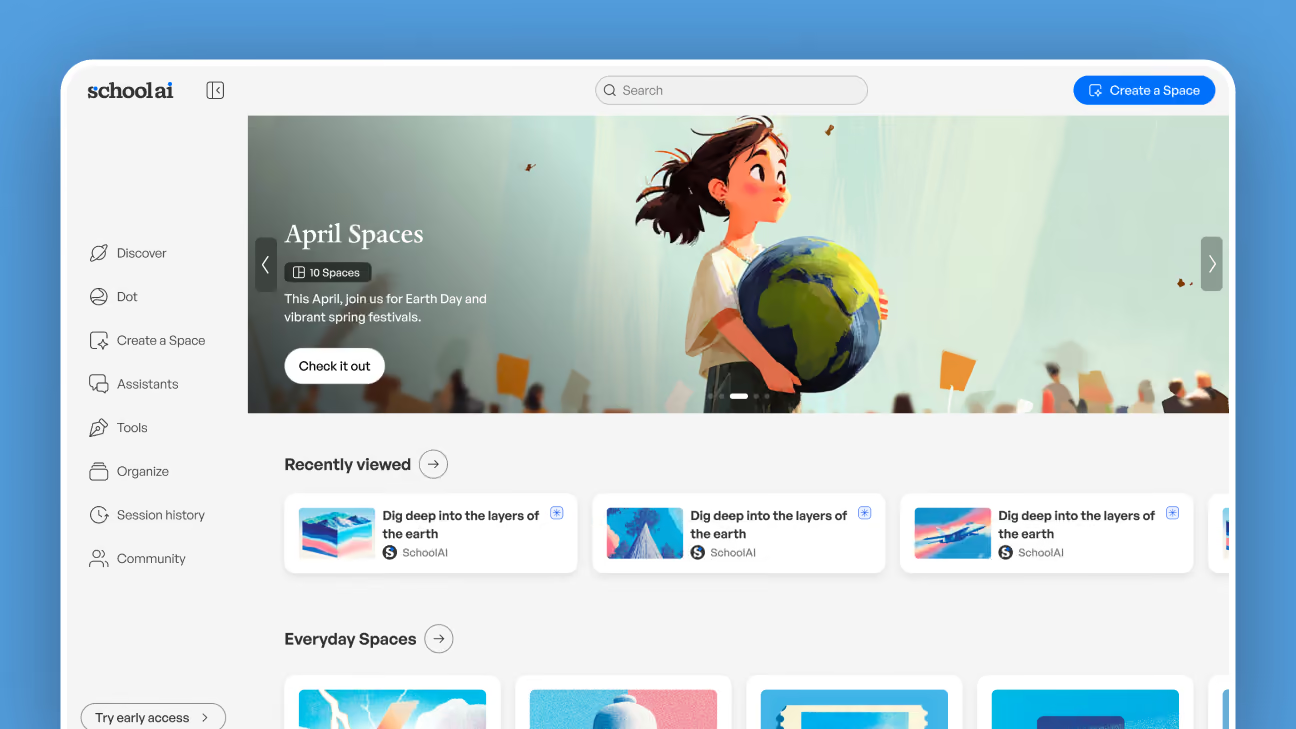
AI curiosity was sending teachers to us in droves, and almost none of them got anywhere. On the growth team I replaced the old Launchpad with Discover, rebuilt onboarding so a teacher’s first session ends with a Space launched to a real class, and redesigned navigation across the product. Discover became the default landing experience in April 2026.
- 2 weeks
- To a teacher’s first launched Space
- 65%
- Of visits end in opening a Space
- Over a third
- Of signups screened out as fake accounts
- April 2026
- Launched as the default landing page
The Problem—Getting teachers in the door was never the hard part
Excitement about AI in education was sending teachers to us in droves, so signups looked healthy. The leak was immediately after: they arrived, looked around, and left without ever launching anything.
The old Launchpad did not help. It was alphabet soup, buttons and links with no hierarchy and no answer to the only question a teacher actually has: what do I do first?
A lot of our new teachers were actually students with fake accounts.
Research turned up something we had not gone looking for: more than a third of new signups were not teachers at all. Students were creating teacher accounts to get around the AI restrictions at their school, which meant the little data we had was not just thin, it was wrong.
And the teachers who did open a Space usually said the same thing. This is cool. Then they closed it and taught the lesson the way they always had. Being impressed is not the same as being ready to try it in front of thirty kids.
The Solution—Walk them all the way to a live classroom
Success was never just a Space opened.
It was a Space taught.
Teachers who launched a Space in their first two weeks stayed with us at a much higher rate than the ones who did not. That became the target.
01—Ask for enough to actually be useful
Onboarding had collected almost nothing accurate. The new version asks four things: grade, subjects, school name and email. School name is the one that pays. Matched against a real school database, it returns location, teaching method, typical curriculum and standards. The form feels light. What it collects is not. It also screened out more than a third of new accounts, which cut real cost and left data that described actual teachers. Then it ends by generating profile pictures from the teacher’s own photo, with accessories drawn from what we now knew: a lei in Hawaii, a knit beanie somewhere cold, safety goggles for a chemistry teacher.
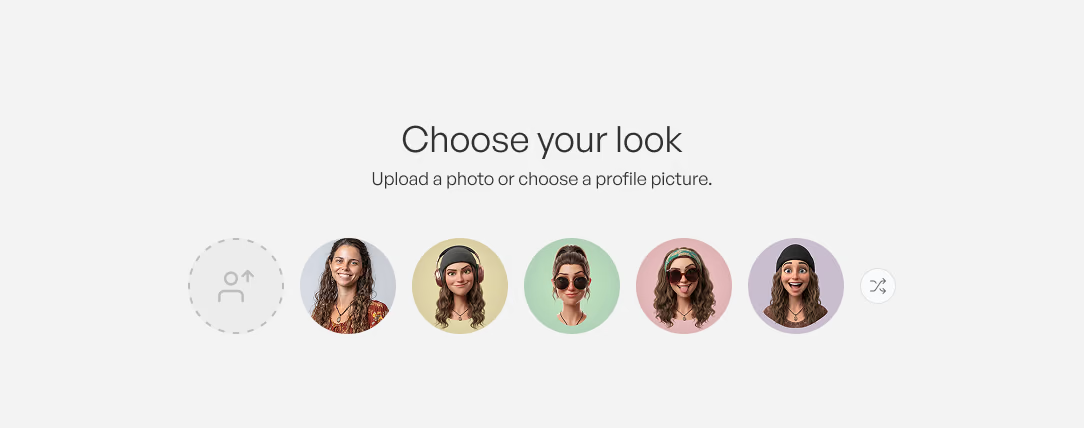
Avatars generated from the teacher’s own photo. Teachers loved this step. 02—Serve the lesson they are teaching this week
Now we could show teachers Spaces that matched what they actually teach, and use the calendar to work out what that grade and subject usually covers this week. Anything we did not already have, we generated: a cover and a title, nothing more. Building every one in full would have been slow and expensive in tokens, so the Space itself was not built until a teacher picked it.
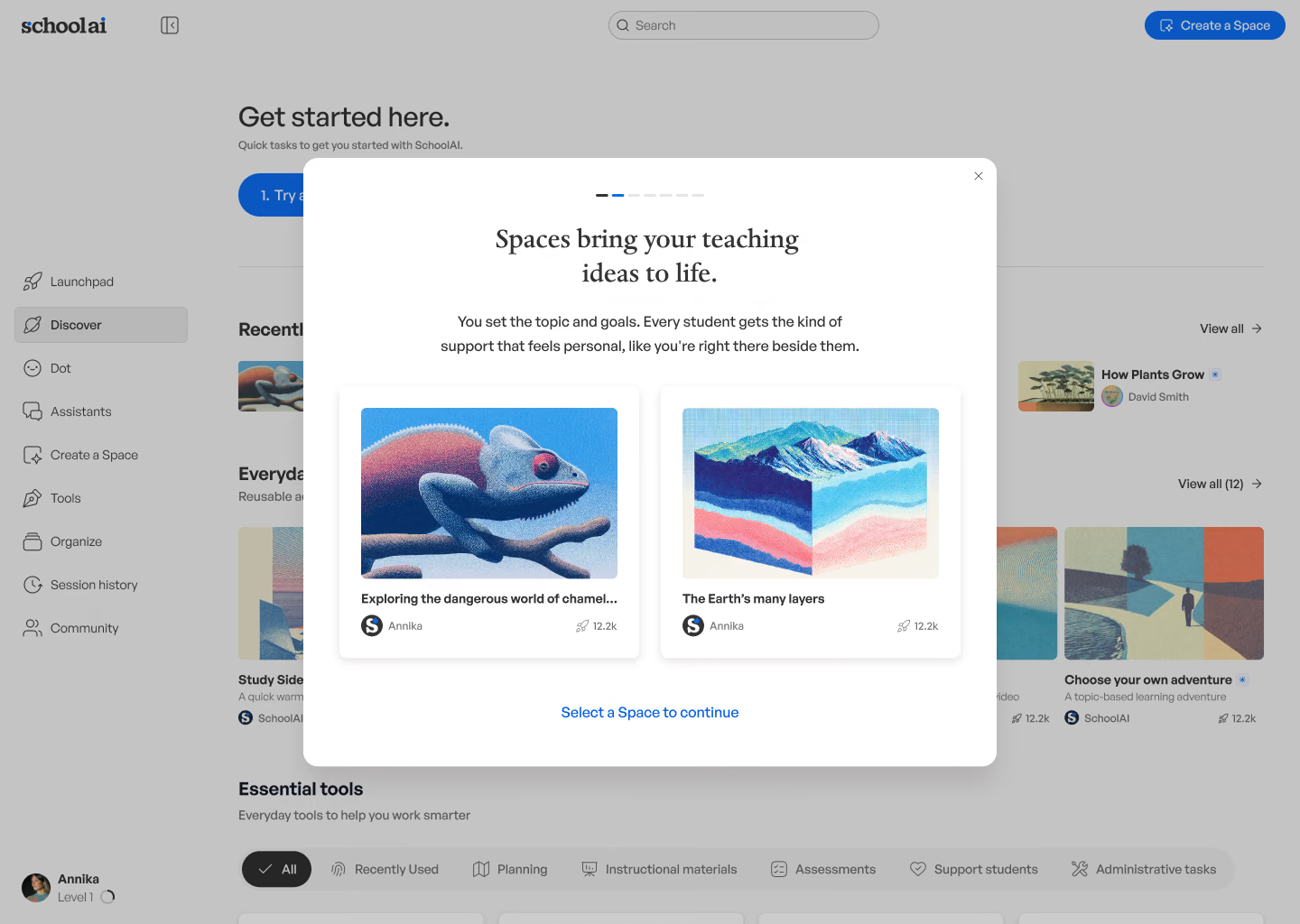
Two Spaces generated during onboarding, matched to what this class is learning right now. 03—Replace Launchpad rather than patch it
Launchpad had become a junk drawer of links. We removed it and made Discover the landing page, a surface with focus that could drive real product-led growth.
04—Walk them all the way to a launched Bellringer
The new flow completes the profile, walks a teacher through what a Bellringer is, then helps them launch one to their real class. Ending on a launched Space rather than an explored one is the whole point: the gap was never interest, it was nerve.
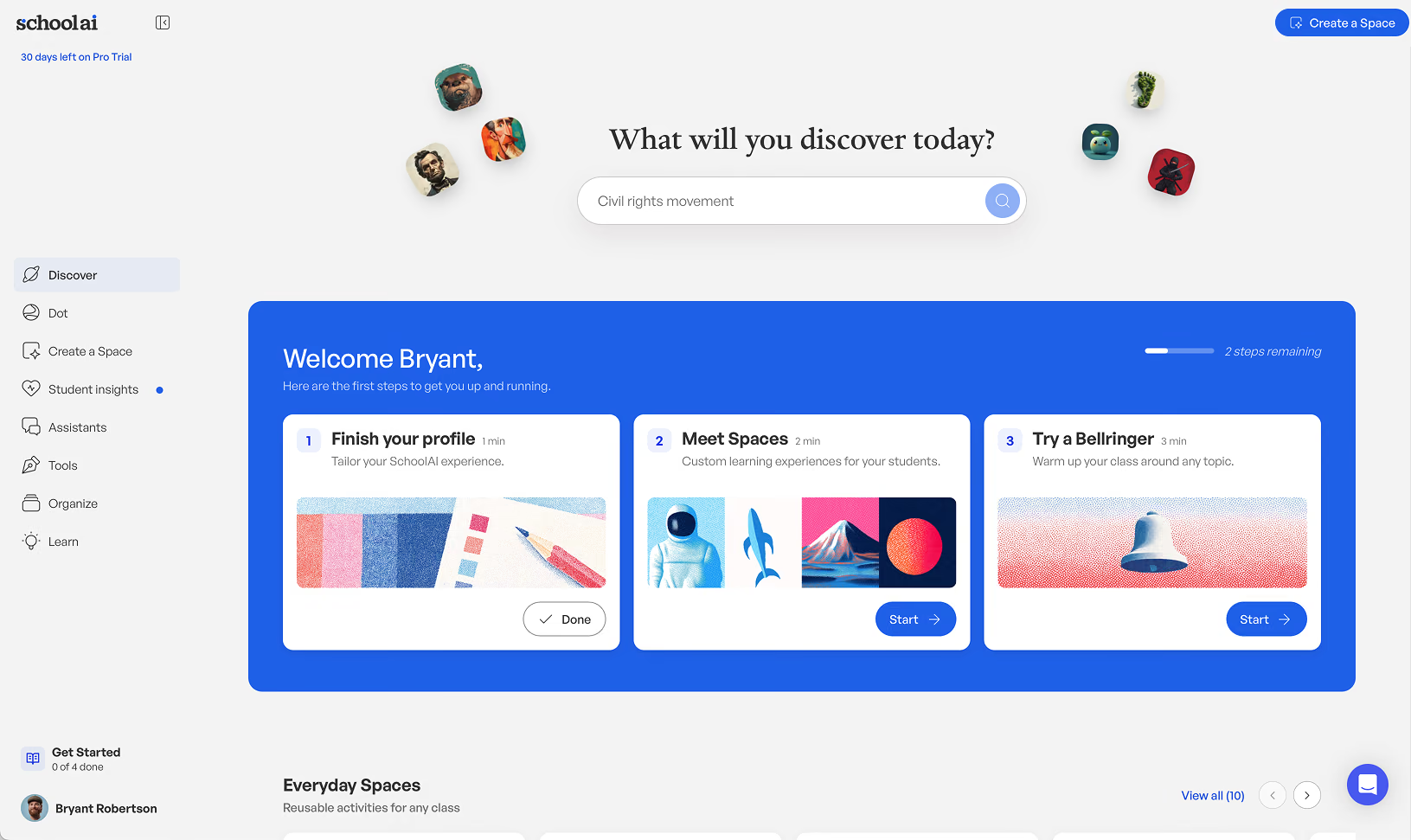
Every step says how long it takes. Three minutes is an easier yes than “try AI with your class.” 05—Group the page the way teachers think
Everything is organized into sections a teacher recognizes: their grade, their subject, what is seasonal right now, and Everyday Spaces, a handpicked set of the most reused Spaces built by the SchoolAI team.
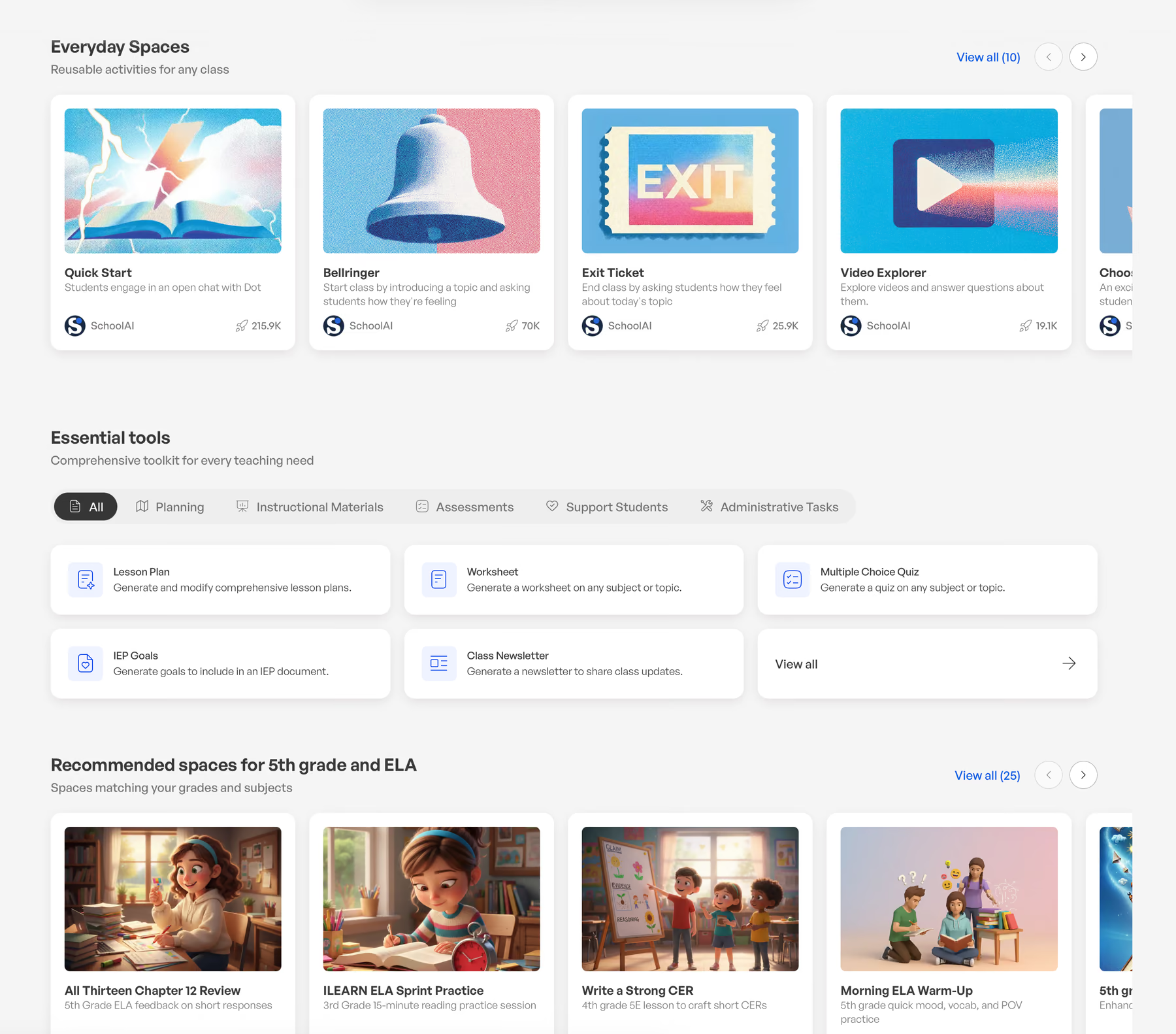
Grouped the way a teacher looks for things, not the way the catalog is stored.
Behavior—What teachers do once they land
Seven weeks of post-launch data told us what the page is actually for.
- 65% of visits included opening a Space. Two in three, which is high for a surface like this.
- 18% browsed a collection and 18% used search, at about 1.2 searches per visit.
- 12% used the carousel, and only 4% created a Space from here.
The low creation rate is the interesting one. Discover is not where teachers go to make something, it is where they go to avoid having to. Reading that as a failure of the create path would have been the wrong conclusion.
Outcome—Where it landed
They stopped telling us it was cool and started teaching with it.
- Teachers launched a Space in their first two weeks, the window where they were far more likely to stick around.
- More than a third of new accounts screened out as students posing as teachers, which cut cost and cleaned up the data.
- Profile data went from thin to usable, which is what made matching a teacher to a Space possible at all.
- Launchpad retired and Discover made the default landing page in April 2026, with no rollback.
- Navigation redesigned across the product, not just the page I was tasked to fix.
Learnings—Key takeaways
Growth work is usually about the second minute
Everyone was focused on getting teachers in, and AI curiosity was doing that for us. The expensive problem was thirty seconds later, when they were in and had no idea what to do.
Onboarding is an input, not a gate
Without grade and subject there was nothing worth putting on the first screen. The fix was not asking for more, it was asking for the one thing that unlocked the rest: a school name returned a dozen answers we never had to collect.
Interest is not readiness
Teachers were opening Spaces and saying they were cool, then teaching the lesson the old way. The flow had to end with one launched to a real class, or nothing had actually happened.
Not every low number is a problem
Only 4% create a Space from Discover. That is the page working as intended: teachers came to find something, not to build something.
Next